사용자의 부재 시간을 감지하는 방법 고르기
방법 1. 메시지 이벤트로 활동 추적
(+) 구현 간단
(+) 실시간 추적
(+) 슬랙 API 호출 불필요
(-) 메시지를 안 보내도 채널을 보고 있는 사람은 감지할 수 없음
(-) 읽음 여부를 알 수 없음
방법 2. Slack Presence API 사용
(+) 실제 온/오프라인 상태 감지
(+) 메시지를 안 보내도 "보고 있는" 사람 감지 가능
(-) Slack API 호출 필요 -> Rate Limit 고려...
(-) 모든 사용자를 추적해야 함 -> 리소스 우려...
방법 3. 데이터베이스 기반 추적
(+) 데이터 영구 보존
(+) 서버 재시작 시에도 데이터 유지
(-) DB 설정 및 관리 필요
(-) 메시지마다 DB Write -> 부하 우려...
방법 4. Redis 기반 추적
(+) 메모리 기반
(+) 속도 빠름
(+) 서버 재시작해도 데이터 유지 -> Redis 별도 운영 시
(+) ConcurrentHashMap보다 안정적
Redis 기반 추적으로 결정 !
* Redis = Remote Dictionary Server
- 메모리 기반 Key - Value 저장소
- 매우 빠름
- 데이터 영속성 지원
- TTL 기능 지원
1. build.gradle 의존성 추가
implementation 'org.springframework.boot:spring-boot-starter-data-redis'
2. Docker로 Redis 실행
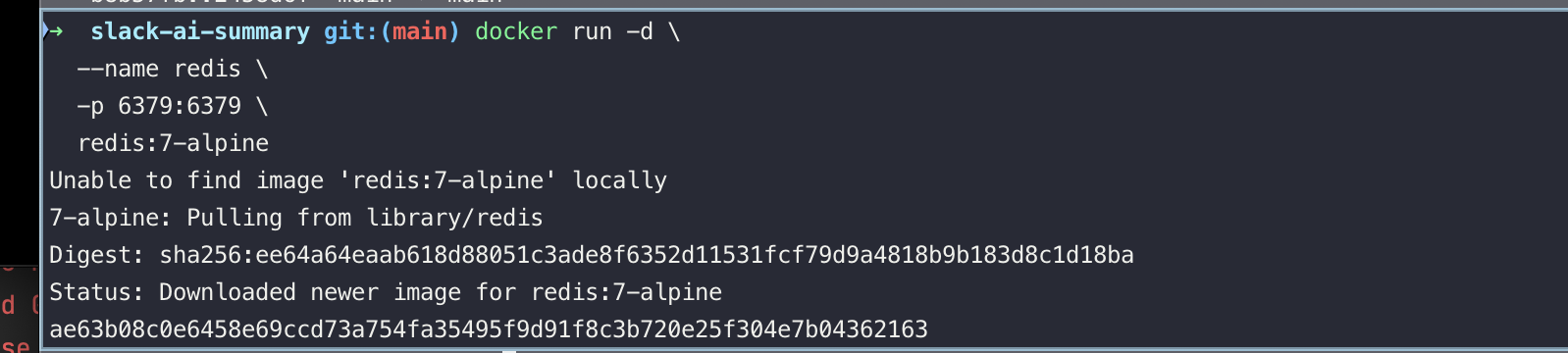

-> Redis 컨테이너 실행 완료
-> 컨테이너 ID : ae63b08c0e64
-> 포트 : 6379
3. docker-compose에 Redis 설정 추가
environment:
      - SPRING_REDIS_HOST=redis
      - SPRING_REDIS_PORT=6379
      - SPRING_REDIS_PASSWORD=
      - SPRING_AI_OPENAI_API_KEY=${OPENAI_API_KEY}
      - SLACK_BOT_TOKEN=${SLACK_BOT_TOKEN}
      - SLACK_SIGNING_SECRET=${SLACK_SIGNING_SECRET}

      ...

# Redis
  redis:
    image: redis:7-alpine
    container_name: slack-redis
    ports:
      - "6379:6379"
    volumes:
      - redis-data:/data
    command: redis-server --appendonly yes
    networks:
      - slack-network
    healthcheck:
      test: ["CMD", "redis-cli", "ping"]
      interval: 5s
      timeout: 3s
      retries: 5
    restart: unless-stopped
RedisConfig 추가
package com.group.slack_ai_summary.config;

import com.fasterxml.jackson.databind.ObjectMapper;
import com.fasterxml.jackson.databind.SerializationFeature;
import com.fasterxml.jackson.datatype.jsr310.JavaTimeModule;
import org.slf4j.Logger;
import org.slf4j.LoggerFactory;
import org.springframework.beans.factory.annotation.Value;
import org.springframework.context.annotation.Bean;
import org.springframework.context.annotation.Configuration;
import org.springframework.data.redis.connection.RedisConnectionFactory;
import org.springframework.data.redis.connection.RedisStandaloneConfiguration;
import org.springframework.data.redis.connection.lettuce.LettuceConnectionFactory;
import org.springframework.data.redis.core.RedisTemplate;
import org.springframework.data.redis.serializer.Jackson2JsonRedisSerializer;
import org.springframework.data.redis.serializer.StringRedisSerializer;

/**
 * Redis 설정 (환경변수 기반)
 */
@Configuration
public class RedisConfig {

    private static final Logger logger = LoggerFactory.getLogger(RedisConfig.class);

    @Value("${SPRING_REDIS_HOST:localhost}")
    private String redisHost;

    @Value("${SPRING_REDIS_PORT:6379}")
    private int redisPort;

    @Value("${SPRING_REDIS_PASSWORD:}")
    private String redisPassword;

    /**
     * Redis 연결 팩토리 설정
     */
    @Bean
    public RedisConnectionFactory redisConnectionFactory() {
        logger.info("Redis 연결 설정 - Host: {}, Port: {}", redisHost, redisPort);

        RedisStandaloneConfiguration config = new RedisStandaloneConfiguration();
        config.setHostName(redisHost);
        config.setPort(redisPort);

        // 비밀번호가 있으면 설정
        if (redisPassword != null && !redisPassword.trim().isEmpty()) {
            config.setPassword(redisPassword);
            logger.info("Redis 비밀번호 설정됨");
        }

        return new LettuceConnectionFactory(config);
    }

    /**
     * RedisTemplate 설정
     *
     * Key: String 직렬화
     * Value: JSON 직렬화 (LocalDateTime 지원)
     */
    @Bean
    public RedisTemplate<String, Object> redisTemplate(
            RedisConnectionFactory connectionFactory) {

        RedisTemplate<String, Object> template = new RedisTemplate<>();
        template.setConnectionFactory(connectionFactory);

        // String Serializer
        StringRedisSerializer stringSerializer = new StringRedisSerializer();

        // JSON Serializer
        Jackson2JsonRedisSerializer<Object> jsonSerializer =
                new Jackson2JsonRedisSerializer<>(Object.class);
        jsonSerializer.setObjectMapper(objectMapper());

        // Key는 String으로 직렬화
        template.setKeySerializer(stringSerializer);
        template.setHashKeySerializer(stringSerializer);

        // Value는 JSON으로 직렬화
        template.setValueSerializer(jsonSerializer);
        template.setHashValueSerializer(jsonSerializer);

        template.afterPropertiesSet();

        logger.info("RedisTemplate 설정 완료");

        return template;
    }

    /**
     * ObjectMapper 설정
     */
    @Bean
    public ObjectMapper objectMapper() {
        ObjectMapper mapper = new ObjectMapper();
        mapper.registerModule(new JavaTimeModule());
        mapper.disable(SerializationFeature.WRITE_DATES_AS_TIMESTAMPS);

        return mapper;
    }
}'Projects' 카테고리의 다른 글
| [Slack AI Bot] Redis로 부재 감지 시간 조정 (0) | 2025.12.07 |
|---|---|
| [Slack AI Bot] 슬랙 메시지 수집 & 디엠 전송 기능 점검 (0) | 2025.11.23 |
| [Slack AI Bot] ngrok으로 로컬 서버 외부 노출 (0) | 2025.11.23 |
| [Slack AI Bot] Slack 애플리케이션 설정 (0) | 2025.11.23 |
| [Slack AI Bot] 스프링 부트 CI/CD 파이프라인 구축 (0) | 2025.11.18 |

