MyBatis 소개
MyBatis는 JdbcTemplate보다 더 많은 기능을 제공하는 SQL Mapper로
가장 큰 장점은 SQL을 XML에 편리하게 작성할 수 있고 동적 쿼리를 매우 편리하게 작성할 수 있다는 점이다.
-> XML에 작성하기 때문에 라인이 길어져도 문자 더하기에 대한 불편함이 없음
-> 동적 쿼리를 매우 편리하게 작성할 수 있는 다양한 기능을 제공해줌
-> JdbcTemplate은 스프링에 내장된 기능이기 때문에 별도 설정 없이 사용할 수 있지만 MyBatis는 약간의 설정이 필요
MyBatis 설정
build.gradle에 mybatis-spring-boot-starter 라이브러리 추가

-> MyBatis를 스프링과 통합하고, 설정도 아주 간단히 할 수 있음
application.properties에 설정 추가

- mybatis.type-aliases-package
: 마이바티스에서 타입 정보 사용 시 패키지 이름을 적어주어야 하는데, 여기에 명시하면 패키지 이름 생략이 가능하다.
: 지정한 패키지와 하위 패키지가 자동으로 인식됨
: 여러 위치 지정시 ,나 ;로 구분
- mybatis.configuration.map-underscore-to-camel-case
: JdbcTemplate의 BeanPropertyRowMapper처럼 언더바를 카멜로 자동 변경해주는 기능 활성화(관례의 불일치 참고)
- logging.level.hello.itemservice.repository.mybatis=trace
: 마이바티스에서 실행되는 쿼리 로그 확인 가능
* 관례의 불일치
자바 객체는 주로 카멜 표기법 사용, 관계형 데이터베이스는 주로 언더스코어 표기법 사용
map-underscore-to-camel-case 기능 활성화 시, 언더스코어를 카멜로 자동 변환해줌
-> DB에서 item_name으로 조회해도 객체의 itemName(setItemName()) 속성에 값이 정상 입력됨
MyBatis 적용
ItemMapper.java : 매퍼 인터페이스
package hello.itemservice.repository.mybatis;

import hello.itemservice.domain.Item;
import hello.itemservice.repository.ItemSearchCond;
import hello.itemservice.repository.ItemUpdateDto;
import org.apache.ibatis.annotations.Mapper;
import org.apache.ibatis.annotations.Param;

import java.util.List;
import java.util.Optional;

@Mapper
public interface ItemMapper {

    void save(Item item);

    void update(@Param("id") Long id,
                @Param("updateParam") ItemUpdateDto updateParam);

    Optional<Item> findById(Long id);

    List<Item> findAll(ItemSearchCond itemSearch);
}
-> 마이바티스 매핑 XML을 호출해주는 매퍼 인터페이스
-> @Mapper 어노테이션을 붙여야 마이바티스가 인식함
ItemMapper.xml(패키지 위치를 맞춰주어야 함)
<?xml version="1.0" encoding="UTF-8"?>
<!DOCTYPE mapper PUBLIC "-//mybatis.org//DTD Mapper 3.0//EN"
"http://mybatis.org/dtd/mybatis-3-mapper.dtd">
<mapper namespace="hello.itemservice.repository.mybatis.ItemMapper">
<!-- 파라미터는 #{} 문법 사용 : PreparedStatement 사용 -->
<!-- JDBC의 ?를 치환한다고 생각하면 됨 -->
<insert id="save" useGeneratedKeys="true" keyProperty="id">
insert into item (item_name, price, quantity)
values (#{itemName}, #{price}, #{quantity})
</insert>
<update id="update">
update item
set item_name=#{updateParam.itemName},
price=#{updateParam.price},
quantity=#{updateParam.quantity}
where id = #{id}
</update>
<select id="findById" resultType="Item">
select id, item_name, price, quantity
from item
where id = #{id}
</select>
<!-- resultType을 바로 Item에 매핑할 수 있음 -->
<!-- application.properties에 type-aliases 속성을 지정해줬기 때문 -->
<select id="findAll" resultType="Item">
select id, item_name, price, quantity
from item
<where>
<if test="itemName != null and itemName != ''">
and item_name like concat('%',#{itemName},'%')
</if>
<if test="maxPrice != null">
and price <= #{maxPrice}
</if>
</where>
</select>
</mapper>-> namespace에 매퍼 인터페이스 지정
* xml 파일을 원하는 위치에 두고 싶으면 application.properties에 다음과 같이 설정하면 된다.
mybatis.mapper-locations=classpath:mapper/**/*.xml
-> resources/mapper를 포함한 그 하위 폴더에 있는 xml을 xml 매핑 파일로 인식한다. 파일 이름은 자유롭게 설정해도 된다.
* XML 특수문자
xml에서는 데이터 영역에 <, > 같은 특수 문자를 사용할 수 없음(tag에 <, > 를 사용하기 때문)
< : <
> : >
& : &
또는, xml에서 지원하는 CDATA 구문 문법을 사용할 수도 있다.
이 구문 안에서는 특수문자 사용이 가능하다. 하지만 이 구문 안에서는 xml tag가 단순 문자로 인식되기 때문에 <if>, <where> 등이 적용되지 않는다.
<if test="maxPrice != null">
    <![CDATA[
    and price <= #{maxPrice}
    ]]>
</if>
MyBatis 분석
ItemMapper 매퍼 인터페이스의 구현체가 없는데 어떻게 동작할까?
-> MyBatis 스프링 연동 모듈에서 자동으로 처리해줌
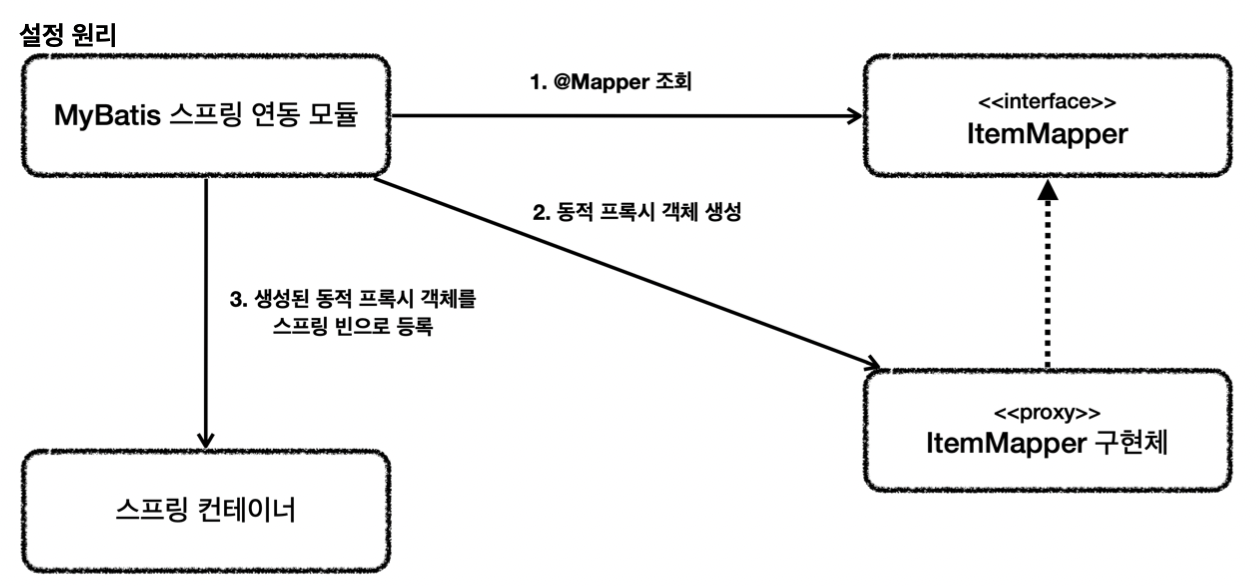
1. 애플리케이션 로딩 시점에 MyBatis 스프링 연동 모듈은 @Mapper가 붙어있는 인터페이스를 조사함
2. 해당 인터페이스가 발견되면 동적 프록시 기술을 사용해 ItemMapper 인터페이스의 구현체를 만듬
3. 생성된 구현체를 스프링 빈으로 등록(JDK 동적 프록시)
-> 매퍼 구현체 덕분에 마이바티스를 스프링에 편리하게 통합해 사용 가능
-> 매퍼 구현체를 사용하면 스프링 예외 추상화도 함께 적용됨
-> 마이바티스 스프링 연동 모듈이 많은 부분을 자동으로 설정해주는데, 데이터베이스 커넥션, 트랜잭션과 관련된 기능도 마이바티스와 함께 연동하고 동기화해줌
MyBatis 기능 정리
동적 SQL
- if
- choose(when, otherwise)
- trim(where, set)
- foreach
애노테이션으로 SQL 작성
@Select("select id, item_name, price, quantity from item where id=#{id}")
Optional<Item> findById(Long id);
- @Insert, @Update, @Delete, @Select
- <select id="..."> </select>는 제거해야 함
- 동적 SQL이 해결되지 않으므로 간단한 경우에만 사용
문자열 대체
#{} 문법은 ?를 넣고 파라미터를 바인딩하는 PreparedStatement를 사용한다.
때로는 파라미터 바인딩이 아닌 문자 그대로를 처리하고 싶은 경우가 존재하는데 이때는 ${}를 사용하면 된다.
@Select("select * from user where ${column} = #{value}")
User findByColumn(@Param("column") String column, @Param("value") String value);
* ${}를 사용하면 SQL 인젝션 공격을 당할 수 있기에 가급적 사용하면 안 된다.
SQL 코드 재사용
<include>를 통해 <sql> 조각을 찾아서 사용이 가능하다.
Result Maps
<resultMap id="userResultMap" type="User">
   <id property="id" column="user_id" />
   <result property="username" column="user_name"/>
   <result property="password" column="hashed_password"/>
</resultMap>

<select id="selectUsers" resultMap="userResultMap">
   select user_id, user_name, hashed_password
   from some_table
   where id = #{id}
</select>'인프런 > 스프링 DB 2편 - 데이터 접근 활용 기술' 카테고리의 다른 글
| [인프런] 스프링 DB 2편 - 데이터 접근 기술 활용 / 6. 데이터 접근 기술 - 스프링 데이터 JPA (0) | 2024.08.11 |
|---|---|
| [인프런] 스프링 DB 2편 - 데이터 접근 기술 활용 / 5. JPA (0) | 2024.08.04 |
| [인프런] 스프링 DB 2편 - 데이터 접근 기술 활용 / 3. 데이터 접근 기술 - 테스트 (2) | 2024.07.22 |
| [인프런] 스프링 DB 2편 - 데이터 접근 기술 활용 / 2. 데이터 접근 기술 - 스프링 JdbcTemplate (1) | 2024.07.18 |
| [인프런] 스프링 DB 2편 - 데이터 접근 기술 활용 / 1. 데이터 접근 기술 - 시작 (0) | 2024.07.03 |


